Controls in one location
The presenter can work from a dedicated station instead of moving between separate laptops, microphones, controllers, and display connections.
 Talk to EduServs
 EduServs Digital Podium Series
EduServs' documented podium range combines presentation surfaces, monitor options, room control, microphones, amplification, drawing and capture functions, and selected computer or interface options across six distinct models.

Product overview
A digital podium provides the presenter with a fixed working position for controlling the lecture or meeting experience. Depending on the model, the documented EduServs range combines a touch or wide monitor, an integrated controller or laptop interface, microphone options, amplification, speakers, drawing software, recording and capture functions, and room connections.
The six catalogue models are not interchangeable. Some are full podium bodies with dual-display options, integrated control, amplification, and speakers. Others are compact lecterns or desk-style configurations. Selection should therefore start with the room, the presenter's workflow, the required audio system, and the interfaces already installed.
Practical value
Each benefit is tied to a documented capability and a clear user need.
The presenter can work from a dedicated station instead of moving between separate laptops, microphones, controllers, and display connections.
The catalogue includes full podium bodies, compact lecterns, a desk configuration, single or dual-display options, and different controller and audio arrangements.
The documented PK Chalk Box software supports writing, drawing, recording, and capture on the applicable models.
Selected models provide HDMI, VGA, LAN, RS232, microphone, and AC power interfaces for connection to presentation and control equipment.
Detailed capabilities
Models use documented 19- to 22-inch or 22-inch wide monitor configurations. PK-600D adds a separate sub-monitor, while several other models use a single touch or wide display. This gives the presenter a local view of teaching or presentation material.
Display configuration varies by model.PK-600D, PK-600SR, PK-600Q, PK-600SU, and PK-796ST document a PKS-7000H controller arrangement. Touch-pad or membrane-keypad control and an HDMI lamp interface vary across those models. PK-600SP instead documents a laptop HDMI interface.
Controller type must be selected from the model table.The range documents gooseneck microphones, wireless hand and pin microphones, and simpler microphone configurations. The correct arrangement depends on whether the room needs a fixed presenter microphone, mobility, or both.
Wireless microphones are not documented for every model.Five models document integrated amplification and 60W speakers in two-unit configurations. Amplifier ratings differ: selected models list 150W x 2 at 4 ohms, while others list 100W at 8 ohms. PK-600SP does not specify an amplifier or speaker in the comparison table.
Audio capability is model-specific.The catalogue associates PK Chalk Box drawing software with writing, drawing, recording, and capture on the first five models. PK-600SP separately documents recording, drawing, and capture as a function.
Software availability and current compatibility require confirmation.PK-600SU documents VGA, LAN, RS232, 5.5 microphone, and AC power inputs. PK-600SP documents AC 220-240V power, an Intel i3 computer with 128GB SSD and 8GB memory, plus automatic actuator height adjustment.
These are historical catalogue specifications and should be revalidated before quotation.Product in action
Facilities or AV team
Presenter
Support team
Documented range
The supplied catalogue documents PK-600D, PK-600SR, PK-600Q, PK-600SU, PK-796ST, and PK-600SP. Product imagery is reproduced from the catalogue; availability, finishes, and current configurations require confirmation.
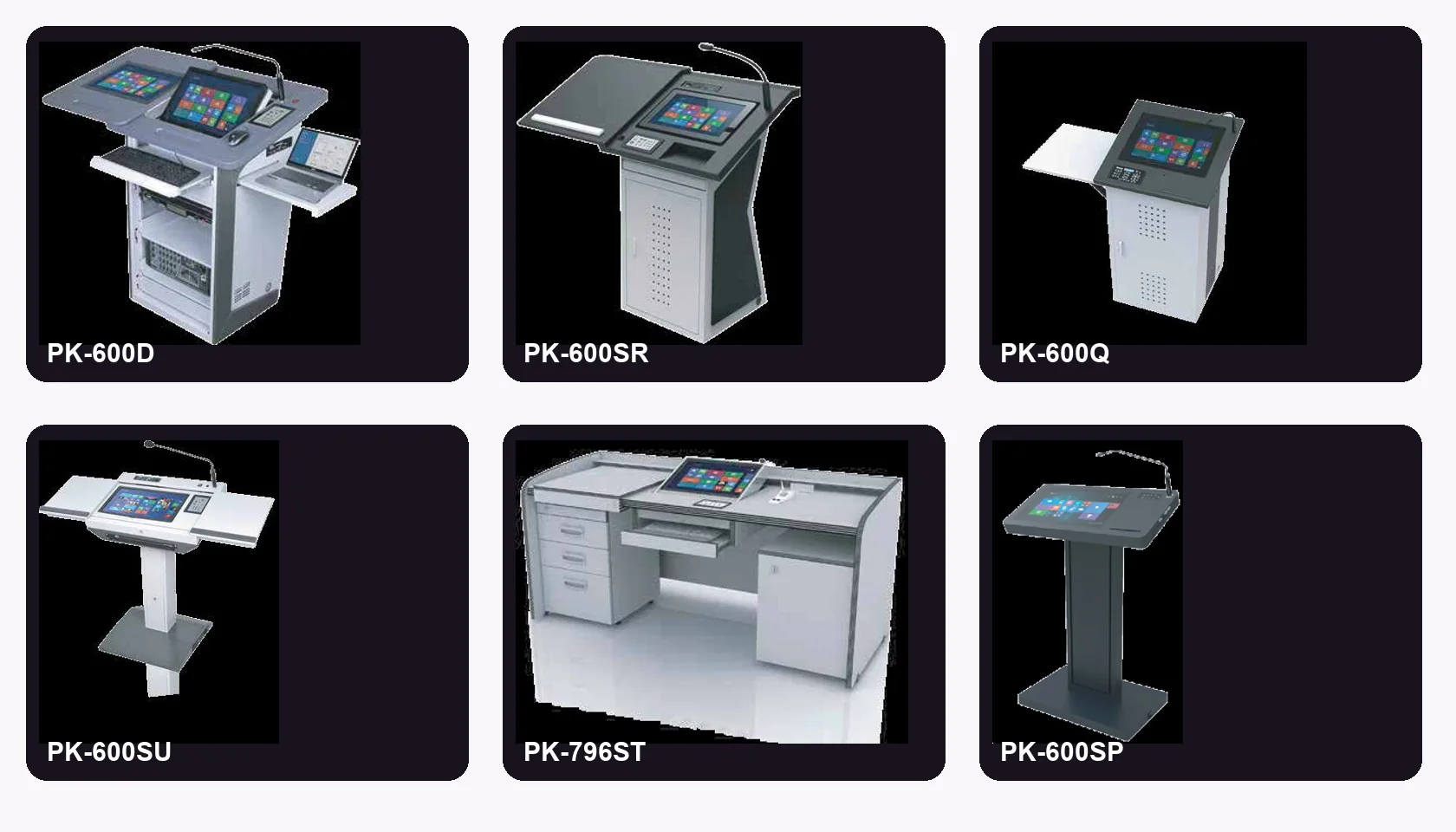
Technical details
The table keeps each documented capability attributed to the correct model. A dash means the catalogue comparison did not specify that item.
| Model | Display | Controller / interface | Microphone | Audio | Other documented functions |
|---|---|---|---|---|---|
| PK-600D | 19-22 in wide touch monitor + 19-22 in sub-monitor | PKS-7000H inside amplifier; 7 in LCD touch pad; lamp interface (HDMI) | Gooseneck + wireless hand and pin | 150W x 2 / 4Ω amplifier; 60W x 2 speakers | PK Chalk Box: writing, drawing, recording, capture |
| PK-600SR | 19-22 in 16:9 wide touch monitor | PKS-7000H inside amplifier; 7 in LCD touch pad; lamp interface (HDMI) | Gooseneck + wireless hand and pin | 150W x 2 / 4Ω amplifier; 60W x 2 speakers | PK Chalk Box: writing, drawing, recording, capture |
| PK-600Q | 22 in 16:9 wide monitor | PKS-7000H inside amplifier; membrane keypad; lamp interface (HDMI) | Microphone type not specified | 100W / 8Ω amplifier; 60W x 2 speakers | PK Chalk Box: writing, drawing, recording, capture |
| PK-600SU | 22 in wide touch monitor | PKS-7000H inside amplifier; 7 in LCD touch pad; lamp interface (HDMI) | Gooseneck | 100W / 8Ω amplifier; 60W x 2 speakers | VGA, LAN, RS232, 5.5 MIC, AC power; writing, drawing, recording, capture |
| PK-796ST | 22 in wide touch monitor | PKS-7000H inside amplifier; 7 in LCD touch pad; lamp interface (HDMI) | Gooseneck + wireless hand and pin per set | 150W x 2 / 4Ω amplifier; 60W x 2 speakers | PK Chalk Box: writing, drawing, recording, capture |
| PK-600SP | 22 in wide touch monitor | Laptop interface (HDMI) | Gooseneck | - | Recording, drawing, capture; AC 220-240V 5A 50/60Hz; Intel i3, 128GB SSD, 8GB memory; automatic up/down actuator |
Specifications are transcribed from the 2022 catalogue and must be reconfirmed for current availability, component substitutions, options, and quotation.
Frequently asked questions
No. The catalogue documents different display configurations. PK-600D, PK-600SR, PK-600SU, PK-796ST, and PK-600SP explicitly list touch monitors; PK-600Q lists a 22-inch 16:9 wide monitor without identifying it as touch-enabled.
No. Wireless hand and pin microphones are documented for PK-600D, PK-600SR, and PK-796ST. PK-600SU and PK-600SP list gooseneck microphones, while PK-600Q only states microphone.
The catalogue lists an Intel i3 processor, 128GB SSD, and 8GB memory for PK-600SP. Current processor generation and component availability must be confirmed before quotation.
Yes. The selection process should review room size, display and audio systems, input interfaces, presenter workflow, accessibility requirements, and support expectations before a model is proposed.
Talk to EduServs