One organised learning space
Courses, activities, resources, assessment, communication, and deadlines are brought together so users spend less time searching across separate systems.
 Talk to EduServs
 Spectrum Learning Management System
Spectrum LMS gives schools, universities, and training organisations one environment for organising courses, sharing content, managing assessment, supporting collaboration, and understanding learner progress.

Product overview
Spectrum LMS is intended for institutions that need a structured way to deliver learning while keeping course activity, resources, deadlines, assessment, and participation visible. It brings these activities into a single web-based environment instead of leaving educators and learners to manage disconnected files, messages, calendars, and records.
The platform supports instructor-led, self-paced, blended, and fully online delivery. Administrators configure the site, enrolment, roles, permissions, and reporting. Teachers build courses, publish resources, set activities, communicate with groups, and evaluate work. Learners use personalised dashboards, calendars, notifications, course pages, and progress information to understand what they need to do next.
Practical value
Each benefit is tied to a documented capability and a clear user need.
Courses, activities, resources, assessment, communication, and deadlines are brought together so users spend less time searching across separate systems.
Course teams can support instructor-led, self-paced, blended, or entirely online learning without changing the basic learner experience.
Activity completion, course-level tracking, grades, reports, and participation logs help educators see where engagement or support may be needed.
Authentication, enrolment, permissions, multilingual options, bulk course creation, and backups give administrators practical control over operation at scale.
Detailed capabilities
Teachers organise courses into a purposeful learning path, add pages and resources, embed material from external sources, and use a browser-based editor to format text and add media. This gives learners a consistent place to find the material associated with each topic or activity.
Useful for structured, blended, and online delivery.Course teams can issue assignments, use quizzes, collect submissions, apply outcomes and rubrics, and support competency-based marking. Inline annotation allows feedback to be added directly to submitted files, while marking workflows help coordinate multiple markers and control when results are released.
Supports individual, peer, self, and group assessment patterns.A personalised dashboard surfaces current, past, and future courses together with tasks that are due. The all-in-one calendar helps users follow scheduled activity, while notifications can alert them to assignments, deadlines, forum activity, and private messages.
Helps each user understand what requires attention.Forums, wikis, glossaries, database activities, collaborative publishing, and group management support discussion and shared work. Educators can group learners, differentiate activities, and create spaces for teamwork without losing connection to the wider course.
Designed for content-led participation and teamwork.Users can manage course files and, where configured, bring material from cloud storage services such as Microsoft OneDrive, Dropbox, and Google Drive. Built-in media support allows audio and video to be placed directly within learning content.
External services require current integration confirmation.Administrators can define user roles and permissions, manage authentication and enrolment, create courses in bulk, back up and restore course data, and review activity and participation reports at course or site level. Multilingual capability can support users who need content in different languages.
Exact deployment and authentication options depend on implementation scope.Product in action
Administrator
Teacher
Learner
Documented interface
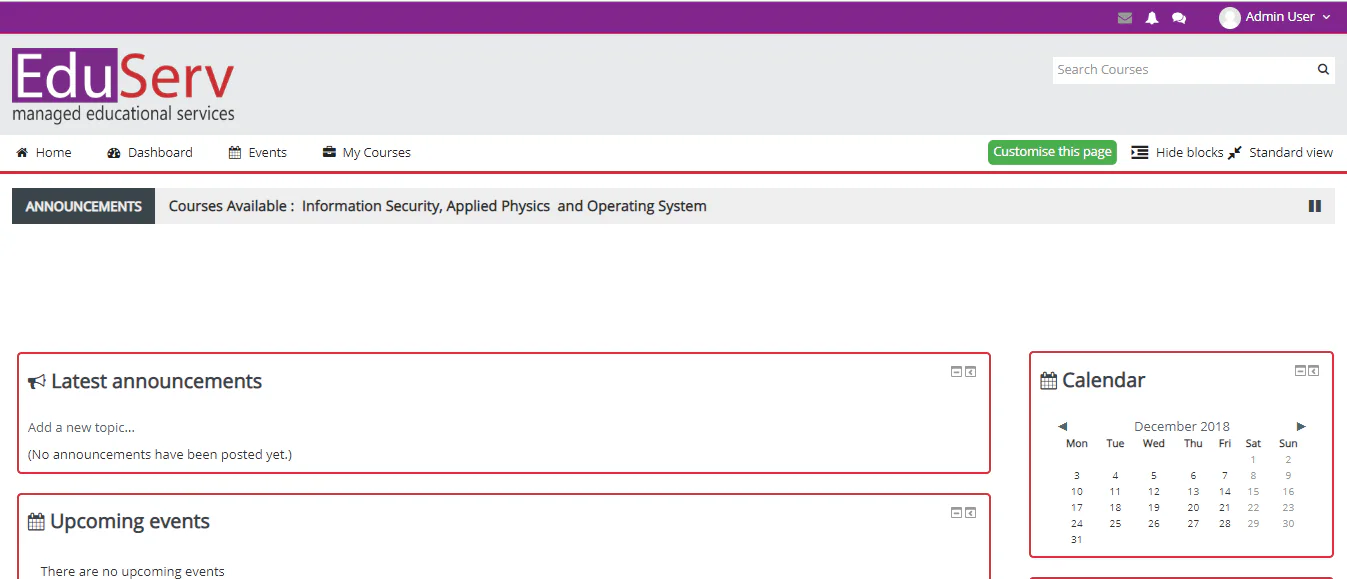
The supplied company brief includes an earlier Spectrum LMS interface showing course navigation, announcements, events, calendar, search, and dashboard controls. The screenshot is presented as historical reference; the current interface should be confirmed before launch.
Technical details
These are functional capabilities described in the supplied company brief. Final deployment architecture and third-party integrations should be confirmed for each implementation.
| Area | Documented capability | Practical use |
|---|---|---|
| Access | Responsive web interface for desktop and mobile devices | Learners and educators can work across common device sizes. |
| Delivery | Instructor-led, self-paced, blended, and online learning paths | Institutions can support different teaching models within one platform. |
| Assessment | Assignments, quizzes, rubrics, outcomes, competency marking, peer and self-assessment | Course teams can select an assessment method that fits the learning design. |
| Administration | Authentication, enrolment, roles, permissions, bulk course creation, backup and restore | Administrators manage access and recurring operational tasks. |
| Reporting | Course and site activity, participation, completion, grades, and logs | Educators and administrators can review engagement and outcomes. |
| Content | Text editing, external resources, audio, video, files, and cloud-storage connections | Teachers can combine multiple resource types inside a course. |
Historical implementation references in the company brief, including specific frameworks and server requirements, require confirmation before being presented as the current platform architecture.
Frequently asked questions
Yes. The supplied documentation describes instructor-led, self-paced, blended, and entirely online learning paths. The final course model is configured around the institution's teaching approach.
The documented capabilities include assignments, quizzes, inline annotation, marking workflows, rubrics, outcomes, competency-based marking, and peer or self-assessment.
The documentation describes activity and course completion tracking, grades, participation information, detailed reports, and site or course-level logs.
Integration and authentication requirements vary by deployment. EduServs should confirm the current supported services, identity methods, hosting model, and implementation scope during discovery.
Talk to EduServs