Connected records
Keep academic, student, teacher, alumni, attendance, and administrative information within one managed system.
 Talk to EduServs
 CREO Campus Management System
CREO brings academic administration, people records, attendance, assessment, communication, fees, finance, timetables, and reporting into one role-based campus management environment.

Product overview
CREO is designed for institutions that need to coordinate academic structures and daily administration without relying on disconnected records. It gives authorised teams a central place to manage students, teachers, alumni, attendance, assessment, timetables, fees, finance, communication, and institutional reports.
The documented system uses role-based administration and flexible custom fields so each institution can reflect its own structures. Academic and administrative teams work in the same environment while seeing the records and controls relevant to their responsibilities.
Practical value
Each benefit is tied to a documented capability and a clear user need.
Keep academic, student, teacher, alumni, attendance, and administrative information within one managed system.
Custom academic structures, forms, fields, grading periods, categories, and scales allow the system to reflect local processes.
Documented email templates, SMS functions, timetables, and API options support communication with students, parents, staff, and administrators.
Academic, assessment, student, fee, account, ledger, and financial reports provide a more complete view of institutional activity.
Detailed capabilities
Administrators can model the institution's academic structure, assign classes and sections to teachers, establish subjects, and organise the timetable around those allocations. This creates the foundation used by attendance, assessment, grading, and reporting.
Student records can be maintained through the learner lifecycle, while alumni information preserves relationships after graduation. Custom forms and fields allow institutions to record information that is specific to their own programmes and processes.
Centralised teacher management, teacher-specific forms, teacher attendance, salary management, student attendance, and role-based administrator access help teams maintain the people and responsibilities behind daily operations.
Institutions can configure grade categories, weighted subjects, grading periods, and grading scales, then use grade books, assessments, and report cards to organise and communicate academic performance.
The catalogue documents integrated SMS, configurable email templates, external communication-service integration, and a central timetable workflow for planning, reviewing, revising, and approving schedules.
Current Twilio, SendGrid, or local API integrations require confirmation.CREO documents fee setup, transactions, multiple invoices, income, liabilities, capital accounts, assets, ledgers, reconciliation, balance sheets, profit-and-loss reporting, and reports covering students, academics, assessment, fees, and accounts.
Accounting configuration should be scoped to the institution's policies and jurisdiction.Product in action
Academic administrator
Teacher or student-services team
Finance and leadership
Documented system scope
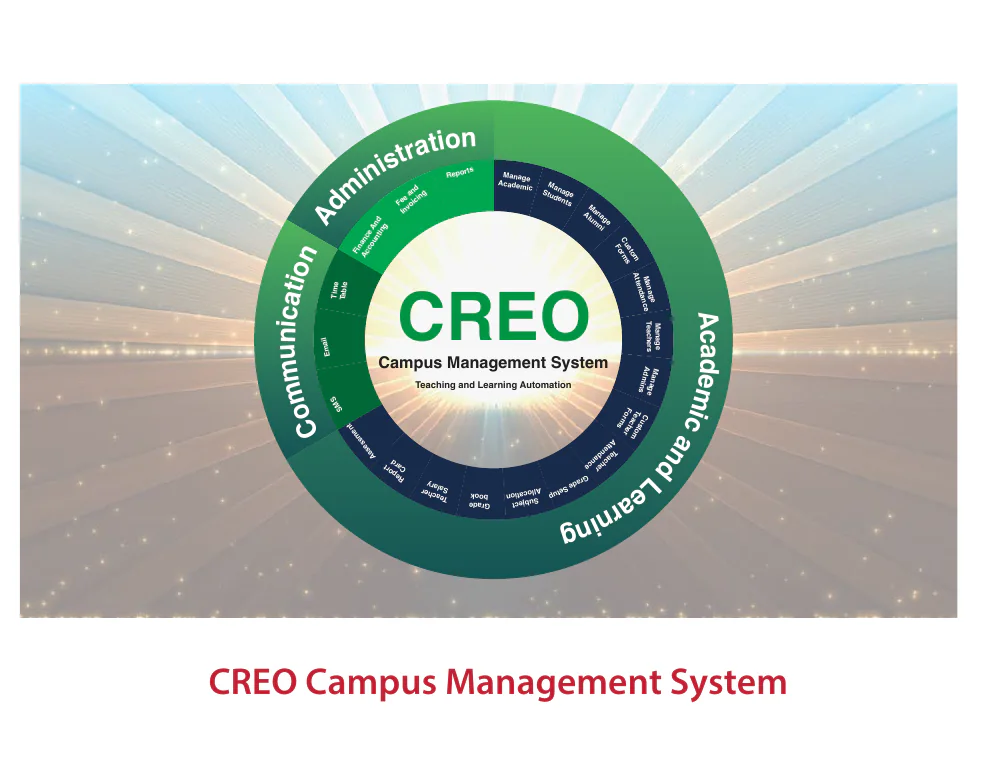
The supplied catalogue maps CREO across academic management, people records, attendance, assessment, reporting, communication, fees, finance, invoicing, and administration. The diagram is historical reference; current modules and deployment scope should be confirmed.
Technical details
The catalogue describes the following areas. Current architecture, integrations, and module availability require implementation confirmation.
| Area | Documented functions | Institutional use |
|---|---|---|
| Academic | Academic structure, subject allocation, timetable, grading, assessment, grade book, report card | Plan and operate the academic cycle. |
| People | Students, alumni, teachers, administrators, attendance, custom forms | Maintain role-based lifecycle records. |
| Communication | SMS, email templates, timetable workflow, API integration | Coordinate messages and schedules. |
| Fees | Custom fee setup, payment transactions, multiple invoices | Manage billing and payment records. |
| Finance | Income, liabilities, capital, assets, ledgers, reconciliation, financial statements | Support institution-level financial administration. |
| Reporting | Student, academic, assessment, fee, account, ledger, and comparison reports | Review activity and performance across functions. |
The 2022 catalogue references a historical .NET/ASP.NET/JavaScript/Angular architecture. It is intentionally not presented as the current technology stack until the client confirms it.
Frequently asked questions
The catalogue documents custom academic structures, forms, fields, grade categories, weighted subjects, grading periods, and grading scales. Final configuration depends on discovery and implementation scope.
The documented modules include fee setup, payment transactions, multiple invoices, accounting records, ledgers, reconciliation, assets, liabilities, and financial reports.
The catalogue describes SMS, custom email templates, timetable workflows, and API-based integration. Current communication providers and delivery methods must be confirmed.
That has not been confirmed. The website focuses on documented business capabilities and treats the catalogue's 2022 architecture details as an approval item.
Talk to EduServs